WORKFLOW AUTOMATION & AI
Workflow automation services
that free your team to focus.
Your team needs time to serve customers, deliver projects, and make decisions. We design and implement workflows that take repetitive steps off their hands and keep information moving between people and tools.
We start with the process, use AI where it helps, and define the decisions your team keeps.
When keeping work moving becomes a job of its own.
A customer request arrives by email. Someone copies the details into another tool, checks what is missing, and asks a colleague for an update. The task itself may be straightforward; coordinating the steps takes the effort.
The same information gets entered again.
Names, project details, and statuses move through forms, inboxes, and spreadsheets. Each handoff depends on someone copying the right information.
Your team has to reconstruct the context.
Before answering a customer or preparing the next task, someone searches messages and records to understand what has already happened.
The next step waits for a reminder.
A request is ready to move forward, but its owner, missing information, or next action is unclear. People spend time chasing progress.
Workflow automation can handle defined steps such as capturing details, applying agreed rules, preparing a handoff, or bringing a request to someone’s attention. Your people can spend more of their time on the work that needs their knowledge.
These situations illustrate possible workflows. The FL Pool project below is a client implementation.
FL POOL BUILDER · CUSTOMER INQUIRIES & SALES
Give the sales team more context before the first conversation.
The pool builder was balancing work on site with calls, missed emails, and early inquiries from people still exploring their options. Handling those conversations added pressure to the administrative and commercial work.
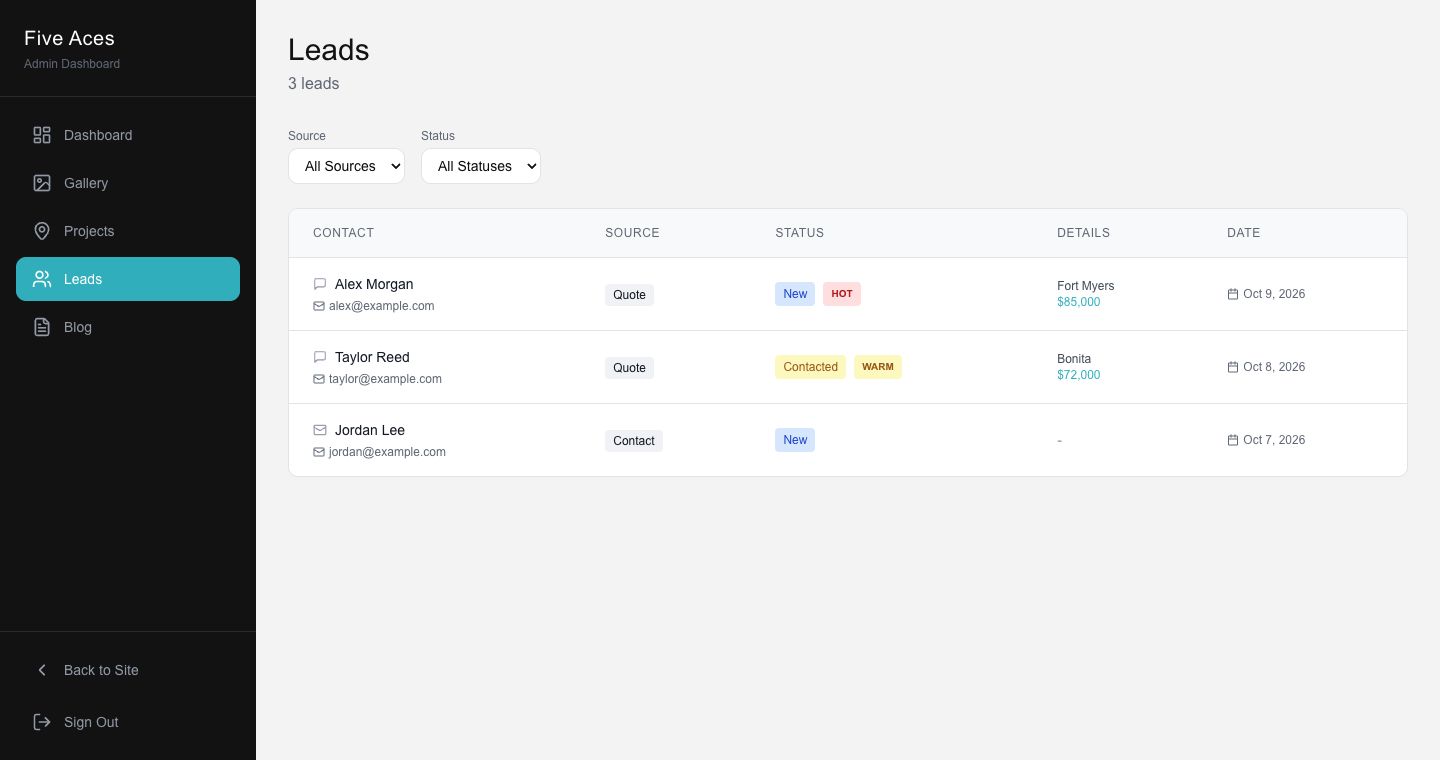
We developed a pool configurator, an AI visualization tool, and a custom internal CRM. Together, they support how potential customers explore a project and how the team manages incoming inquiries.
A preliminary estimate based on the customer’s choices.
Visitors choose a pool design, finishes, surrounding surfaces, and optional features. The configurator calculates an indicative estimate using the prices supplied by the builder. Questions about timing, budget, and available funds add context to the inquiry.
Collect the project details.
The visitor’s selections describe what they are considering.
Calculate the initial estimate.
Defined prices and rules determine the indicative amount.
Help the team prioritize.
A score based on the qualifying answers accompanies the request in the internal CRM.
Continue with a person.
The team reviews the inquiry, contacts the potential customer, explores the requirements, and prepares the final quote.
AI helps the customer explore the idea.
In a separate visualization flow, a visitor can upload a backyard photo and choose a pool design to generate a visual concept. A link then takes them to the calculator with that design selected.
The AI creates the concept image. The estimate and lead score use defined rules; the sales team handles the conversation and final proposal.
Prequalified inquiries have made the client’s sales process easier to manage.
The client uses the custom CRM to manage real inquiries. The initial estimate is indicative; the final quote follows a discussion of the project. Generated images are visual concepts, not construction drawings.
Give each step the right kind of support.
AI workflow automation is useful when a step benefits from interpreting or generating content. Other steps need a predictable rule, and some decisions need a person. We define those boundaries around the process.
Rules for defined steps.
Use known inputs and agreed logic to calculate, organize, or move information. In FL Pool, selected options determine the estimate and qualifying answers determine the score.
AI for a useful contribution.
Use AI for a task that benefits from generation or interpretation, with a way to assess the output. In FL Pool, that task is producing a pool concept from a backyard photo.
People for judgment and relationships.
Keep the team involved where context, responsibility, or customer understanding matters. In FL Pool, people assess the inquiry and prepare the final quote.
For each workflow, we identify what happens when information is missing, a step fails, or a result needs review. Those paths belong in the design alongside the usual sequence.
Start with one process that gets in your team’s way.
A useful starting point is a task people repeat, the tools they use, and where the work slows down. We work through the process before choosing how to implement it.
Understand the work.
We look at what starts the process, who handles it, how often it happens, and which information each step needs. We include the exceptions people currently manage.
Choose the steps to automate.
We identify repetitive work that can follow rules or benefit from AI, then define a focused scope. The first implementation needs a clear purpose and a way to check whether it helps.
Define the human decisions.
We agree where your team reviews, approves, or takes over, including what happens when the workflow cannot continue as expected.
Implement and check the workflow.
We build the agreed steps and check the main path, handoffs, and exceptions against the requirements. What we connect depends on the access and capabilities of your existing systems.
Build around the tools and information you already use.
The workflow may involve customer records, forms, email, documents, or an internal application. We assess what each system can share or receive, which permissions are available, and whether the data is ready for the task.
If your existing tools can support the process, the work may focus on connecting and coordinating them. When the team needs its own screens, roles, or shared view of a request, the solution may also include a custom application. FL Pool’s internal CRM is one example of that combination.
What shapes the cost of workflow automation?
The scope depends on the steps involved, the systems they connect to, the quality of the information, and the exceptions the workflow must handle. AI tasks and custom interfaces can add different requirements.
We assess the work needed for the initial implementation alongside recurring services, usage costs, and maintenance requirements. A focused process makes it easier to define the work and decide what is worth automating first.
Questions before automating a workflow.
Does workflow automation need AI?
No. A step with clear inputs and an agreed rule may work without AI. In the FL Pool calculator, prices determine the estimate. AI serves a different purpose in the visualization tool. We choose the approach according to what each step needs to do.
Is this suitable for a small business?
A small team can begin with a focused process, such as collecting the details needed for a sales conversation. The decision depends on the work involved, how often it happens, and the effort required to build and maintain the solution.
Can we keep our existing tools?
Where they can support the workflow. We check their interfaces, permissions, data, and limitations before proposing connections. That assessment may show that configuring an existing tool is enough, or that a specific part needs custom development.
What happens when something needs a person?
We define the handoff as part of the workflow: what the person receives, what they need to decide, and how the process continues. Missing information, failed steps, and cases outside the agreed rules need an explicit path.
Who maintains the workflow after launch?
Responsibilities, access, and any ongoing support need to be agreed as part of the project. Changes to connected tools, data, or the business process may require updates. The scope of maintenance and recurring services should be clear before release.
How do we decide what to automate first?
Start with a repeated task that creates avoidable coordination work. Describe who handles it, the information they need, and where progress gets difficult. We use that context to assess feasibility and define a first scope.
LET’S TALK THROUGH THE WORK
Which process is taking time away from your team?
Tell us what people repeat, how often it happens, and which tools they use. Where do they copy information, chase updates, or wait for the next step?
We can start by understanding that process and what your team needs to stay in control of. You do not need to choose an AI tool before the conversation.
One process is enough to start the conversation.